
Glossary
Production Order
A production order is an internal instruction to make a set quantity of one item by a set date. Released status authorises work but does not confirm materials are ready.

By Praveen Nune, Co-Founder & CEO · Updated 23 Oct 2026
Also called Work order
On this page
- 01Definition
- 02Quick facts
- 03Introduction
- 04Key takeaways
- 05What goes on a production order?
- 06What does "released" mean on a production order?
- 07How to check a production order is ready to release: BOM, components, partial start
- 08Release check: issue method, scrap route, output and due date
- 09Worked example: 90 rejects and the GST production account
- 10What is a production order confused with?
- 11How Arka Inventory handles it
- 12Example
- 13Related terms
- 14Frequently asked
What is a production order?
A production order is an internal document that authorises the shop floor to make a stated quantity of one item by a due date.
Key takeaways
- Released means work may start, not that materials are ready, so test availability before you release.
- Whether stock moves at release depends on the system and the consumption method you set.
- Set an issue method for each component so consumption is recorded at the right moment.
- Record actual consumption, good output and scrap to keep book stock matching the shelf and the monthly production account.
- Give rejects a scrap location and a scrap allowance on the order.
Quick facts
- Also known as
- Work order (ERPNext)
- Where it comes from
- Planning, a sales order or by hand
- Business Central statuses
- Simulated, Planned, Firm Planned, Released, Finished
- Used in
- SAP, Business Central and Dynamics 365
- Record it feeds
- Monthly production accounts under Rule 56(12) of the CGST Rules
Introduction
Most factories can say what a production order is. Fewer can say what happens to stock when someone presses Release. In Business Central the answer depends on a setting. In SAP it depends on how goods are issued.
That gap is where stock records drift. When components are consumed at the wrong moment, or never recorded, the book quantity stops matching the shelf. The error then flows into the monthly production account that a registered manufacturer keeps under Goods and Services Tax (GST) rules, where quantities of raw materials used and goods made must be shown.
This page gives you a one-page template, a six-point release check and a worked example with 90 rejects. It is written for small and mid-size manufacturers in India who record production in Tally, Excel or a first inventory system. Each test can be run before you release an order, so the document guards your stock instead of just describing it.
Key takeaways
- A production order tells the shop floor to make a stated quantity of one item by a due date, using a bill of materials (BOM, the component list for one unit).
- "Released" means work may start. Test material availability yourself before you release.
- The name varies: SAP and Business Central say production order, and ERPNext says work order.
- Record actual consumption, good output and scrap, because registered manufacturers must keep monthly production accounts under Rule 56(12) of the Central GST (CGST) Rules.
What goes on a production order?
It names the item, the BOM, the dates and the cost, then collects what was actually used and produced. Orders come from planning, from a sales order or by hand (Microsoft Learn). A one-page version needs these fields:
- Field
- Order number, source
- What to enter
- Unique number; the sales order, reorder or forecast behind it
- Field
- Item, quantity
- What to enter
- Finished item, units, unit of measure
- Field
- BOM version
- What to enter
- The version approved today
- Field
- Start and due dates
- What to enter
- Planned dates
- Field
- Components
- What to enter
- Required, on hand and short, per line
- Field
- Scrap allowance
- What to enter
- Percentage per component; where rejects go
- Field
- Issue method
- What to enter
- Manual, at start or at finish, per component
- Field
- Status
- What to enter
- Planned, released, finished, closed
- Field
- Actuals
- What to enter
- Consumed, good output, scrap
- Field
- Cost
- What to enter
- Planned against actual material and labour
What does "released" mean on a production order?
Released means the order is authorised for execution, not that its materials are ready. Business Central's documentation says a released order "doesn't necessarily mean that materials are picked or the project moves to its first operation" (Microsoft Learn). Business Central, SAP and Dynamics 365 treat release as permission to start; they differ on when stock moves.
Released means work may start, not that materials are ready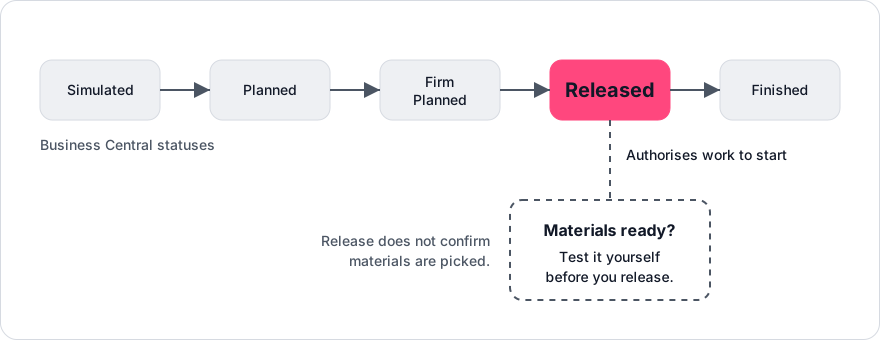
Business Central offers three consumption methods, where Forward and Backward are flushing (automatic consumption): Manual (consumption journal), Forward (consumed at release, unless routing link codes are used) and Backward (consumed when the order is finished). SAP backflushes when an operation or the order is confirmed. So test material availability yourself before releasing.
- System
- Business Central (Microsoft Learn)
- Key statuses
- Simulated, Planned, Firm Planned, Released, Finished
- Documented behaviour
- Actual consumption and output are recorded on released orders; finished orders can be reopened once
- System
- SAP S/4HANA (SAP Learning)
- Key statuses
- Released, then technically complete (TECO)
- Documented behaviour
- Release is required before execution; materials issue by picking list, transaction or backflush; TECO locks the order
- System
- Dynamics 365 Supply Chain (Microsoft Learn)
- Key statuses
- Created to Ended
- Documented behaviour
- The BOM and route are copied to the order and can be edited until it starts
- System
- TallyPrime (Tally Help)
- Key statuses
- Journal-based
- Documented behaviour
- The manufacturing guide describes a BOM and a Manufacturing Journal, not a production order document
How to check a production order is ready to release: BOM, components, partial start
Run six tests and release only when all pass.
Is the BOM version current?
Pass: the order carries the version approved today. Fail: the BOM was edited since the last order for this item.
Are all components available?
Pass: for every line, on-hand stock not committed elsewhere is at least order quantity × BOM quantity per unit × (1 + scrap allowance). Fail: any line is short, so wait or split the order.
Is there a partial-start rule?
Pass: the order lists which components must be on hand to start and which may follow. Fail: the order lists no start-critical components.
Release check: issue method, scrap route, output and due date
Is the issue method set for each component?
Pass: each component line shows manual, at start or at finish, and the method was reviewed for this order. Backflush only components with steady usage. Fail: any component's issue method is blank or was not reviewed for this order.
Is there a scrap route?
Pass: a scrap location exists and the order records a scrap allowance. Either finish the order and move rejects to the scrap location, or move rejected materials from work in progress to scrap and short-close the order (closing it below the ordered quantity). Fail: there is no scrap location, or no allowance on the order.
Are the output location and due date set?
Pass: finished goods have a named location, and the due date falls after the longest supplier lead time among short components. Fail: either is missing.
Worked example: 90 rejects and the GST production account
Planned use is 1,000 × 2.0 = 2,000 m. Actual use is 2,150 ÷ 910 = 2.36 m per good unit. A system that backflushes BOM quantity on good output alone would deduct 910 × 2.0 = 1,820 m. Stock would then be overstated by 2,150 − 1,820 = 330 m, about 15% of the cable issued, which a cycle count would expose later.
Those figures are what GST asks for. Under Rule 56(12) of the CGST Rules, 2017, a registered manufacturer maintains "monthly production accounts showing quantitative details of raw materials or services used in the manufacture and quantitative details of the goods so manufactured including the waste and by products thereof" (Central Board of Indirect Taxes and Customs, Rule 56, as reproduced by TaxGuru, October 2026).
What is a production order confused with?
A production order is not a purchase order, and in many systems it is the same document as a work order.
- Work order. ERPNext uses "work order" for the plan to make a stated quantity, and generates job cards (per-operation tasks) from it (ERPNext documentation). Treat the terms as one document unless your system splits it by operation.
- Purchase order. It buys components from a supplier; a production order makes items in-house and can trigger purchases for short components. See the purchase order process.
How Arka Inventory handles it
Arka Inventory builds production on bills of material, and it starts on the Advance plan. As of October 2026, Advance costs US$499 a month billed yearly, with two user licences included and extra users at $52 a month (pricing).
Its manufacturing feature covers process, discrete and assembly manufacturing. It shows the cost of production and work in progress. Arka Inventory supports standard and order-based bills of material. It lets you check material availability against the bill of materials before production starts and record the materials used for each production batch.
There is a 15-day free trial with full access and no credit card. Onboarding takes at least two weeks, depending on data readiness.
Example
A 1,000-unit order that issues 2,150 m of cable and yields 910 good units plus 90 rejects uses 2.36 m per good unit against a BOM of 2.0 m, about 18% over plan.
Frequently asked
Sources
- 1.About production orders, Business Central (Microsoft Learn)
- 2.Production order lifecycle overview, Dynamics 365 Supply Chain (Microsoft Learn)
- 3.Production order processing (SAP Learning)
- 4.Inventory in manufacturing (Tally Help)
- 5.Rule 56, CGST Rules (Central Board of Indirect Taxes and Customs)
- 6.TaxGuru text of Rules 56(2) and 56(12)
- 7.Create and process a Work Order (ERPNext documentation)