
Glossary
Multi-Level Bill of Materials (BOM)
A multi-level bill of materials (BOM) lists components in tiers, so each sub-assembly appears with its own parts beneath it.

By Praveen Nune, Co-Founder & CEO · Updated 24 Oct 2026
Also called Indented BOM
On this page
- 01Definition
- 02Quick facts
- 03What is a multi-level BOM?
- 04How much does a multi-level BOM change what you buy?
- 05Should a sub-assembly get its own level, become a phantom, or be flattened?
- 06Where do multi-level BOMs go wrong?
- 07What five checks should software pass for multi-level BOMs?
- 08How Arka Inventory handles it
- 09Example
- 10Related terms
- 11Frequently asked
What is a multi-level BOM?
A multi-level BOM is a bill of materials, the list of parts and quantities needed to make one product, in which sub-assemblies have their own BOMs below the finished product.
Key takeaways
- A sub-assembly earns its own level only if you hold it as stock, use it in more than one product, or plan it separately.
- A flat list that ignores sub-assembly stock and yield overstates purchases. In the 100-pump model it says buy 260 bearings where the multi-level calculation says 238.
- A sub-assembly built and used in the same run belongs in a phantom or a flat list, not a stocked level.
- Test any software with five pass-or-fail checks, using your own deepest product, before relying on it.
Quick facts
- Also known as
- Indented BOM
- Level numbering
- Level 0 is the finished product, level 1 its direct components, down to bought-in parts
- How it is built
- Bottom-up: lowest-level BOMs first, then used as components in the BOMs above
- Expanded by
- A BOM explosion, giving the total of every bought part
The tree diagram is the easy part of a multi-level BOM. The costly part is deciding which sub-assemblies earn their own level. Every level adds a stock record to count, a cost to roll up and a revision to keep in step.
Decide well and purchase quantities come out right. Decide badly and the system buys parts you have already built into sub-assemblies. It can also hide work in progress (WIP, partly finished stock) that someone has to find by walking the shop floor.
In the 100-pump model below, a list that ignores built sub-assemblies and scrap overbuys by 22 bearings on a single part.
This page defines the term and works one example for 100 pumps, small enough to check by hand. It also gives a table for choosing how to model each sub-assembly, and five checks to run on any software before you commit.
What is a multi-level BOM?
A multi-level BOM is also called an indented BOM. Level 0 is the finished product, level 1 its direct components, and so on down to bought-in parts.
The pump as a tiered parts tree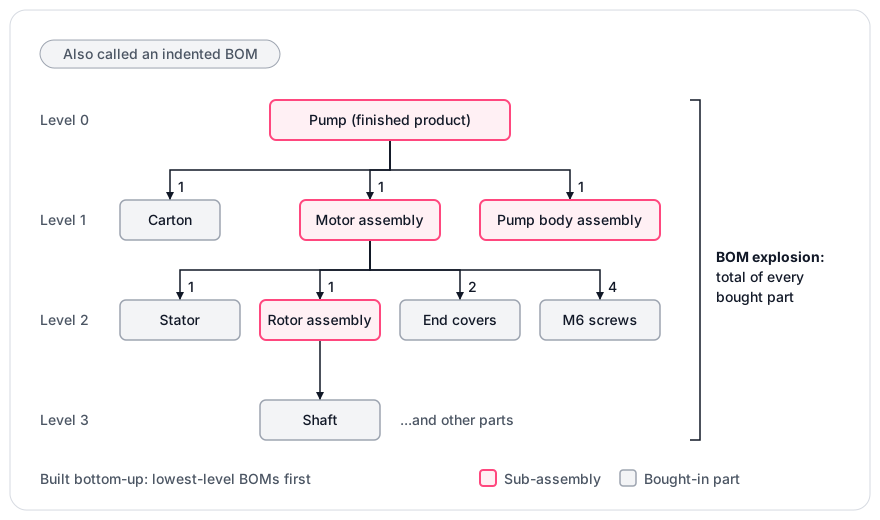
- Bottom-up construction. Build the lowest-level BOMs first, then use those items as components in the BOMs above them.
- Explosion. Expanding the tree into the total of every bought part is called a BOM explosion. Material requirements planning (MRP) then turns those quantities into purchase and build plans; see material requirements planning.
- One part, several levels. A part can sit at more than one level. The explosion must add the quantities together.
- Single-level BOM. It lists only direct components and ignores what the sub-assemblies contain.
How much does a multi-level BOM change what you buy?
In a model of 100 pumps, a flat list that ignores sub-assembly stock and yield says buy 260 bearings and the multi-level calculation says 238. The gap comes from stock held at sub-assembly level. Yield losses also compound through the levels. Yield is the share of units that come out good; a 98% yield means 2 in 100 units are scrapped, so you must start more units than you need.
The structure is:
- Pump (level 0): 1 motor assembly, 1 pump body assembly, 1 carton.
- Motor assembly (level 1): 1 stator, 1 rotor assembly, 2 end covers, 4 M6 screws.
- Rotor assembly (level 2): 1 shaft, 1 rotor core, 2 bearings.
- Pump body assembly (level 1): 1 casing, 1 impeller, 1 seal, 1 bearing, 6 M6 screws.
These are illustrative assumptions, not customer data. Motor assembly yield is 99%, rotor assembly yield is 98%, and pump body yield is 100%. On hand are 15 finished rotor assemblies and 40 loose bearings. Stock is netted against the requirement first, then yield is applied to the build quantity. Quantities are rounded up at each level, because you cannot build part of a unit.
The flat list's 260 ignores sub-assembly stock and yield, and its overstatement of 22 bearings (260 − 238) comes from that omission. Yield loss can push other parts up instead: M6 screws come to 4 × 10² + 6 × 100 = 1,008, against 1,000 on a flat list.
- Step
- Flat list, bearings
- Working
- (2 + 1) × 100
- Result
- 300
- Step
- Motor assemblies to build
- Working
- 100 ÷ 0.99 = 101.01, rounded up
- Result
- 102
- Step
- Rotor assemblies needed
- Working
- one per motor assembly
- Result
- 102
- Step
- Net of rotor stock
- Working
- 102 − 15 on hand
- Result
- 87
- Step
- Rotor assemblies to build
- Working
- 87 ÷ 0.98 = 88.78, rounded up
- Result
- 89
- Step
- Bearings needed
- Working
- 2 × 89 + 1 × 100
- Result
- 278
- Step
- Bearings to buy
- Working
- 278 − 40 on hand
- Result
- 238
- Step
- Flat list, bearings to buy
- Working
- 300 − 40 on hand
- Result
- 260
Should a sub-assembly get its own level, become a phantom, or be flattened?
Give a sub-assembly its own stocked level only if you hold it as stock, share it across products, or plan it separately. Make it a phantom if it is built and consumed in one run. A phantom is a sub-assembly defined in the BOM but never held as stock, so its parts pass straight to the parent. Otherwise flatten it.
Use a phantom when you want the sub-assembly's parts and quantities kept as a separate, reusable BOM; flatten when the step appears in one product only.
The recommended approach is to start flat and add a level only when one of the first three answers in the table is yes. With the same yields, a phantom and a flat list give the same purchase quantities. The difference is whether a stock record and a production order exist for that step. Every stocked level means more production orders, more material moves and more WIP inventory to value.
- Question about the sub-assembly
- Do you build it ahead and hold it on a shelf or in WIP?
- If yes
- Stocked level
- Question about the sub-assembly
- Does more than one finished product use it?
- If yes
- Stocked level, so one revision reaches every parent
- Question about the sub-assembly
- Does it have its own lead time, supplier or team?
- If yes
- Stocked level
- Question about the sub-assembly
- Is it built and consumed in one run, never counted?
- If yes
- Phantom
- Question about the sub-assembly
- Do the steps run back to back at adjacent stations within hours?
- If yes
- Flatten: one BOM, one production order
Where do multi-level BOMs go wrong?
They go wrong at revisions, at handoffs between levels and at the line between BOMs and kits.
- Revisions ripple upward. A change to a low-level part forces new versions of every parent that uses it. Before approving a change, list every parent that uses the part.
- Sub-levels must exist first. A stocked sub-assembly must be built before the parent that uses it. Each stocked level is one more build to schedule.
- Kits are not multi-level BOMs. A kit is a set of items sold together as one line. A multi-level BOM describes things you assemble.
- Costs move with the levels. A sub-assembly's full cost, including its own labour and overhead, rolls into the parent as a single material-cost line. The parent's labour and overhead lines cover only work done at the parent level. See BOM costing.
What five checks should software pass for multi-level BOMs?
Run these with your own deepest product, or the pump above.
- Explosion. Enter a three-level product. Pass: one view lists every bought part with its total quantity. Fail: only direct components appear.
- Stock netting. Set motor yield to 99% and rotor yield to 98%, enter 15 rotor assemblies and 40 bearings on hand, and rerun the 100-pump requirement. Pass: bearings to buy show 238. Fail: any other figure, once you have checked the software's rounding rule.
- Revision. Change one low-level part. Pass: the system shows every parent that uses it and lets you version them. Fail: parents silently keep the old version.
- Cost roll-up. Pass: the sub-assembly cost shows on its own line and in the parent, and the total reconciles by hand. Fail: you cannot reconcile it.
- Build. Build one pump. Pass: finished stock rises by 1 and nothing is deducted twice. Fail: any bought part moves twice.
How Arka Inventory handles it
Our bill of materials feature lets you create bills of materials for multi-component products. You can check material availability against each BOM, plan purchases, and track consumption and production.
Bills of Material, production and kitting are on our Advance plan. As of October 2026 it costs US$499 a month, paid yearly, with 2 user licences and extra users at US$52 a month. Our pricing is published in US dollars. Each user signs in with a Salesforce login, and Salesforce licences are bought from Salesforce and priced separately. For buying advice, see Bill of Materials Software, or ask our sales team about your product's structure.
Run the five checks above on your deepest real product in our 15-day free trial, which gives full access with no credit card.
Example
For 100 pumps, 102 motor assemblies must be built to allow for 99% yield. After netting 15 finished rotor assemblies, 89 more are built at 98% yield, using 2 × 89 + 1 × 100 = 278 bearings. With 40 bearings on hand, the buy is 238, not the flat list's 260.
Frequently asked
Sources
- 1.Bill of Material feature, Arka Inventory
- 2.Pricing, Arka Inventory, October 2026