
TL;DR
At Arka Inventory, we use batch expiry software to link dates to traceable lots through receiving, FEFO picking, alerts, holds, and recall records. This guide explains the date fields, shelf-life rules, exception workflow, and selection tests that distinguish execution-ready expiry control from a simple stored date.
Batch Expiry Software for FEFO Operations
Food-date confusion accounts for an estimated 20 percent of consumer food waste. For lot-and-serial operations, the operational risk begins earlier, when a date is stored but never used to control receiving, allocation, or picking.
Batch expiry software should record expiry dates against traceable lots and carry those dates through receiving, storage, allocation, picking, alerts, quarantine, and recall reporting. True FEFO selects eligible stock with the earliest expiry first, while FIFO follows receipt order. Buyers should test enforcement, approved overrides, and audit history in each workflow.
We explain the fields, controls, and warehouse tests that make expiry management useful in daily work. We also show where a date field stops being enough.
What Date Fields Should Expiry-Controlled Lots Use?
A date only becomes useful when its meaning is explicit. We treat a lot or batch as the traceable inventory group, then keep its production, quality, and expiry dates distinct so warehouse teams do not make safety or fulfillment decisions from an ambiguous label.
| Field | Operational Meaning | Typical Use |
|---|---|---|
| Lot | A traceable group with a shared origin or characteristic | Receiving, movements, recalls |
| Batch | Often a production-run identifier | Manufacturing and genealogy |
| Production Date | Date the item or batch was made | Shelf-life calculation |
| Best-By | Quality-oriented date | Rotation and customer communication |
| Sell-By | Retail display-management date | Store planning |
| Use-By Or Expiry | Consumption or use cutoff defined by product rules | FEFO, holds, disposition |
GS1 distinguishes batch or lot with Application Identifier 10, production date with 11, best-before date with 15, and expiry date with 17 in its barcode guidance. That structure matters because a best-by date may drive a commercial decision, while an expiry date may need to block a shipment.
Our lot tracking workflow connects lot records with quantities, locations, production information, and expiry information. The practical standard is simple: the same lot identity must follow stock wherever it is received, stored, transformed, transferred, returned, or shipped.
How Does Batch Expiry Software Capture Data Across the Lifecycle?
The strongest expiry controls begin at the first inventory event. If a supplier lot arrives without a validated date, every later alert, pick recommendation, and recall search inherits that weakness.
Capture at Receiving
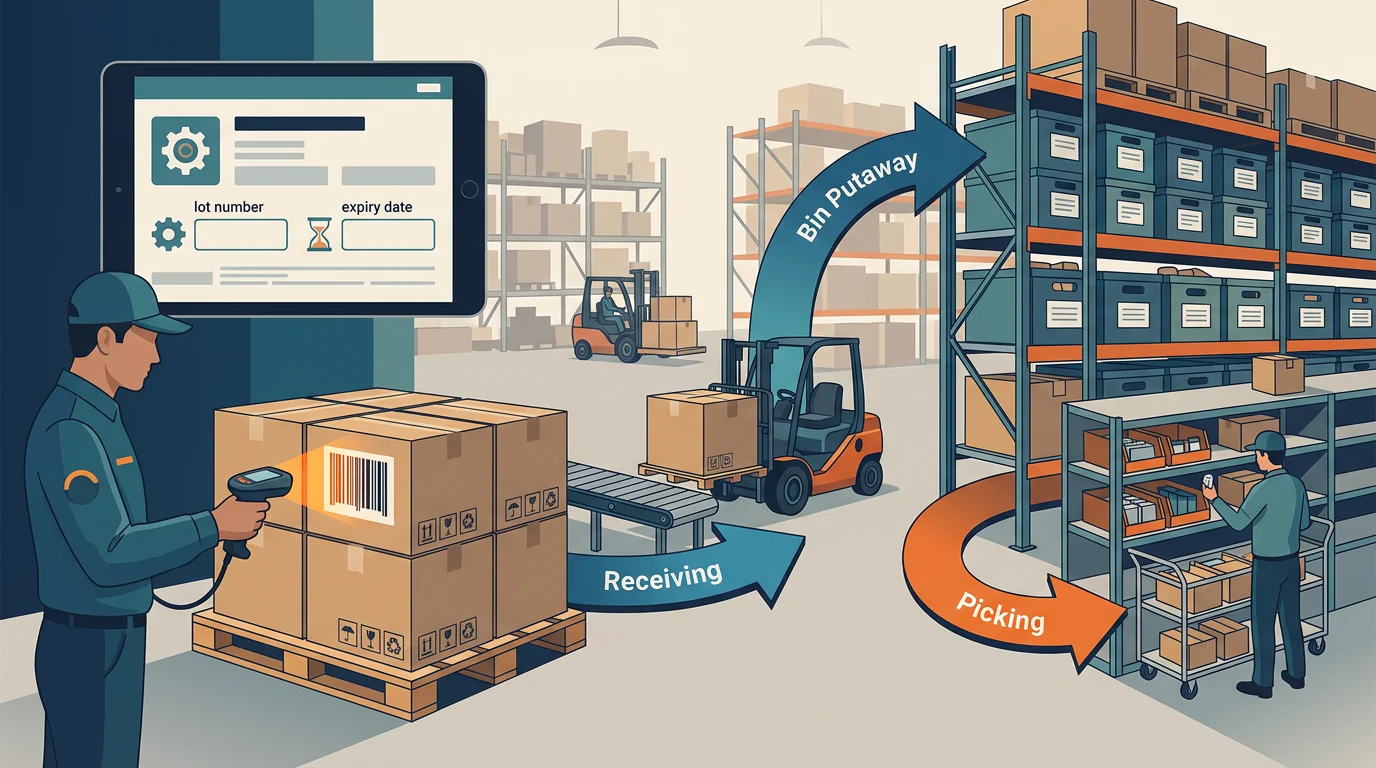
We capture the supplier lot or batch, quantity, location, and the relevant date type when goods are received. A scanner should reduce rekeying, but it should not allow incomplete or already-expired data to pass without a documented exception.
Use an inbound strategy that checks label format, duplicate lot IDs, quantity, product match, and date validity before inventory becomes available. This protects FEFO before it has to make a picking decision.
Preserve Inputs During Production
Production needs input-lot and output-batch relationships. When material lots become a finished batch, we preserve the consumed lots, quantity, production event, output date, and destination location so a quality issue can be traced in either direction.
Control Relabeling and Returns
Relabeling, returns, and adjustments should create history rather than replace history. We recommend a reason code, prior value, new value, authorized user, timestamp, and affected quantity whenever a lot date or status changes.
Validate Imports Before Posting
Imports can speed up a migration, but they can also turn old spreadsheet errors into live warehouse errors. We validate product-to-lot relationships, date formats, locations, quantities, duplicate records, and stock status before making imported inventory eligible to allocate.
Our warehouse workflows support barcode-based receiving, pallets, bins, picking, and packing. That creates a useful bridge between the lot record and the physical work happening on the floor.
How Do Alerts and Shelf-Life Rules Prevent Short-Dated Shipments?
Expiry alerts should give teams time to act, not merely document an issue after a shipment fails. We recommend a dashboard that separates stock into 90-day watch, 60-day action, and 30-day escalation buckets, then assigns a person and a permitted response to each bucket.
Those thresholds are operating policies, not universal legal defaults. A product with a short life may require a tighter window, while a customer may require a minimum number of remaining days at delivery. The important control is that an order cannot receive a lot that fails the product rule, customer rule, or approved exception path.
| Control | Question To Test | Passing Outcome |
|---|---|---|
| Shelf-Life Rule | Can each item require minimum remaining life? | Ineligible lots cannot allocate |
| Customer Constraint | Can one customer require more remaining life? | Order-specific eligibility changes |
| Expiry Alert | Can recipients and thresholds be configured? | Teams receive actionable alerts |
| Dashboard Bucket | Can lots be grouped by days remaining? | Risk is visible before expiry |
| Override History | Can an exception be approved and traced? | User, reason, and time are retained |
Our inventory alerts help teams react to inventory events, while reports and dashboards give operations leaders a place to monitor the risk queue. In a demo, ask to configure the exact alert thresholds, recipients, and escalation logic your team will use.
How Does FEFO Differ from FIFO in Warehouse Picking?
FIFO follows receipt order. FEFO follows the earliest expiry among stock that is actually eligible to ship. The distinction becomes important whenever a later receipt expires before an earlier one, or a customer needs more remaining shelf life than the nearest-expiry lot can provide.
We use FEFO as a directed-picking discipline. The system should first exclude held, expired, reserved, unavailable, or insufficient-life lots. It should then recommend the earliest eligible expiry and preserve an override when a worker chooses another lot.
| Decision Point | FIFO | FEFO |
|---|---|---|
| Sort Key | Earliest receipt | Earliest eligible expiry |
| Primary Fit | Stable stock | Date-sensitive lots |
| Warehouse Prompt | Oldest receipt first | Nearest expiry first |
| Main Failure Risk | Newer receipt expires first | Bad date data or uncontrolled overrides |
| Audit Evidence | Receipt timestamp | Lot, date, user, and override reason |
FEFO does not eliminate judgment. A picker may need an approved exception for a customer shelf-life rule, partial pallet, quality hold, or operational constraint. That is why we connect lot selection to inventory commitments, so allocation and order promising do not ignore the actual stock that can be shipped.
How Do Teams Handle Holds, Quarantine, and Recalls?
Expiry management needs a controlled path for stock that cannot move normally. Expired, rejected, damaged, or short-dated lots should leave sellable inventory immediately, enter a hold or quarantine status, and require an authorized disposition before they can reappear in fulfillment.

Put Short-Dated Stock on Hold
A hold should stop allocation, directed picking, and transfer until the relevant team reviews the lot. That review can lead to release, transfer, return to supplier, permitted donation, approved sale, or disposal, depending on the product rule and policy.
Keep Recall Evidence Searchable
A recall-ready record connects an affected lot to its receipt, production relationship, warehouse locations, quantity on hand, customer shipments, and prior dispositions. The FDA explains that covered food businesses may need to provide requested information in an electronic sortable spreadsheet during an outbreak, recall, or public-health threat, and its current compliance date is July 20, 2028.
Compare Lifecycle Depth, Not Date Fields
A product comparison should test the full lifecycle rather than awarding a checkmark for an expiry field. We publish lot and serial tracking, barcode receiving, bin-directed work, multi-warehouse operations, and first-expiring lot picking for lot-enabled products. For controls not published as native behavior, including minimum-life enforcement, quarantine routing, recall reporting, and override audit detail, require a live demonstration.
| Platform Type | Native Capability To Confirm | Integration Question | Verified Price And Evidence |
|---|---|---|---|
| Arka Inventory | Lot, batch, production date, expiry, barcode receiving, multi-warehouse picking | Confirm required connected systems in the proposed setup | Enterprise includes lot and serial tracking with flexible pricing; Basic is $199/month and Advance is $499/month, both billed yearly, checked 24 September 2026 |
| Date-Field Tool | Whether dates affect allocation and picking | Whether lot history survives external updates | Require published pricing and a workflow demo |
| Warehouse Execution Suite | Whether FEFO is enforced at pick confirmation | Whether holds and returns retain lot status | Require implementation and integration costs |
| Traceability System | Whether forward and backward trace covers every movement | Whether warehouse execution is native or connected | Require recall-export and audit evidence |
Review our pricing plans alongside the workflow test. The right choice is not the system with the most date fields. It is the one that proves the intended action at receiving, allocation, picking, exception handling, and recall review.
See Batch Expiry Operations in Arka Inventory
At Arka Inventory, we build inventory operations for teams that need expiry dates to affect warehouse work, not sit in a report. Our published capabilities include lot and serial tracking, barcode-based receiving, bin-directed picking, multiple warehouses, custom reporting, and picking lot-enabled products that expire first. We also keep the operational conversation honest: your team should see how a proposed setup captures supplier dates, applies your minimum-life rules, handles a short-dated exception, and preserves the resulting history.
Bring one recent receipt, one sales order, and one hypothetical recall to a demo. We will map the lot fields, scanning steps, dashboard views, and approval path around your actual process. Then you can decide whether our configuration provides the workflow control your operation needs, including the limits that deserve confirmation before rollout without forcing your operators to rely on paper notes or memory alone. Explore Arka Inventory
FAQs on Batch Expiry Software
What Is the Difference Between a Lot and a Batch?
A lot identifies inventory with a shared traceable origin or characteristic. A batch commonly identifies a manufacturing run. Both should link quantities, dates, locations, and movements.
Is FEFO the Same as FIFO?
No. FIFO chooses the oldest receipt, while FEFO chooses the eligible lot with the nearest relevant expiry date. FEFO is more suitable when shelf life drives fulfillment risk.
Can a System Track Expiry Dates Without Enforcing FEFO?
Yes. A system can store dates and produce reports without directing or blocking picks. Ask to see pick recommendations, override approval, and lot-level transaction history.
What Evidence Helps During a Recall?
Keep the affected lot, product, quantity, receipt, production relationship, warehouse locations, customer shipments, holds, dispositions, users, timestamps, and source documents connected in searchable records for review.