
Glossary
Barcode vs QR Code
Barcode vs QR code: a basic 1D barcode holds an ID, though GS1-128 also carries lot and expiry, while a QR code holds far more and needs a 2D scanner or phone.

By Praveen Nune, Co-Founder & CEO · Updated 24 Oct 2026
Also called 1D barcode vs 2D code
On this page
- 01Definition
- 02Quick facts
- 03What is the difference between a barcode and a QR code?
- 04Which should you print on stock labels, a barcode or a QR code?
- 05Can a barcode scanner read a QR code?
- 06How much damage can a QR code take?
- 07How do you test a barcode vs QR code on your own labels?
- 08What other 2D codes will you meet on stock labels and invoices, besides QR codes?
- 09How Arka Inventory handles it
- 10Example
- 11Related terms
- 12Frequently asked
What is the difference between a barcode and a QR code?
A barcode is a one-dimensional code of lines that usually holds an ID, while a QR code (Quick Response code) is a two-dimensional grid holding far more data.
Key takeaways
- For one Zebra model pair (LS2208 laser, DS2208 imager) at two Indian retailers on 24 October 2026, the imager cost 3.6% to 6.2% more.
- Set QR error correction to match the floor: higher levels survive more damage but make the code larger.
- Test before you print: make both formats at real size, scan with every device, scuff the labels and scan again.
Quick facts
- QR capacity
- Up to 7,089 digits, 4,296 alphanumeric characters or 2,953 bytes of binary data
- Traditional barcode capacity
- A maximum of 48 characters, per GS1 India
- QR specified under
- ISO/IEC 18004, by inventor Denso Wave
- QR error correction levels
- L, M, Q and H (7%, 15%, 25%, 30%)
- Scanner needed for QR
- 2D imaging scanner or phone camera
The scanner on your packing bench settles this choice before the label does, because not every scanner reads both codes.
Capacity is rarely the deciding factor in a stockroom. A bin label usually carries a short ID that software looks up, while a lot label may need to carry the lot number and expiry date itself. The right format depends on which of those jobs the label does.
You get a comparison table and a ten-minute label test.
What is the difference between a barcode and a QR code?
A barcode is a one-dimensional code of lines and spaces that usually holds only an identification key, such as a product number. A QR code (Quick Response code) is a two-dimensional code, a grid of squares read in both directions. It can hold variable data such as batch or lot number and expiry date.
One-dimensional barcode beside two-dimensional QR code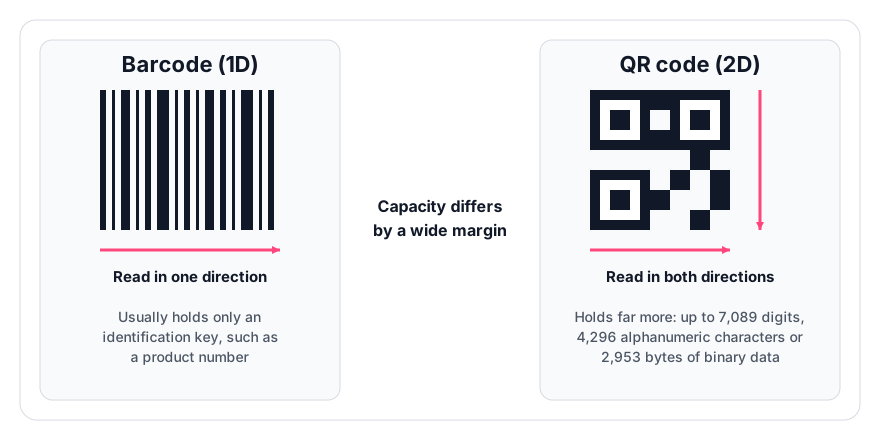
Capacity differs by a wide margin. A standard QR code holds up to 7,089 digits, 4,296 alphanumeric characters or 2,953 bytes of binary data, as Denso Wave, the inventor, specifies under ISO/IEC 18004. GS1 India puts a traditional barcode at a maximum of 48 characters. GS1 is the body that sets product-barcode standards. Capacity depends on the barcode type, so check the limit of the specific format you print.
Which should you print on stock labels, a barcode or a QR code?
Print a barcode when the label only identifies an item and your scanners read it. Print a QR code when the label must carry data, be read by a phone camera, or survive scuffing (QR codes have error-correction settings, explained below).
- Label job
- Retail pack sold at a till
- Start with
- UPC/EAN barcode (the retail point-of-sale barcodes)
- Why
- Point-of-sale formats, per GS1 US
- Label job
- Carton not scanned at a till
- Start with
- ITF-14 (a carton barcode) or GS1-128 (a 1D barcode that carries lot and date)
- Why
- GS1-128 carries batch/lot, best-before date and quantity, per GS1 US
- Label job
- Bin, shelf or pallet ID looked up in software
- Start with
- 1D barcode, or QR if you use imagers or phones
- Why
- The code only needs an ID
- Label job
- Label carrying lot, expiry or a link
- Start with
- GS1-128 barcode if your scanners are laser, QR or Data Matrix (a compact 2D code) if they are imagers
- Why
- GS1-128 carries lot and expiry (GS1 US); all the GS1-approved 2D options can encode them too (GS1)
- Label job
- Label likely to be scuffed or dirty
- Start with
- QR at level Q or H (QR error-correction settings, explained below), printed larger
- Why
- Denso Wave advice on error correction
Can a barcode scanner read a QR code?
A laser-only barcode scanner cannot read a QR code, while an imaging (2D) scanner, which reads a picture of the label rather than a single line, reads both. Zebra's LS2208 laser model decodes Code 39, Code 128, Code 93, Codabar and UPC/EAN. Its DS2208 imaging sibling decodes QR, DataMatrix, PDF417 and Aztec.
Prices are from four retailer listings dated 24 October 2026. Each percentage is the gap divided by the laser price. This is one model pair at two retailers, so it is indicative only. If you are buying a scanner now, buy the imager.
- Retailer
- Computech
- LS2208 (laser)
- ₹5,499
- DS2208 (imager)
- ₹5,699
- Gap
- ₹200 (3.6%)
- Retailer
- TPSTech
- LS2208 (laser)
- ₹6,396
- DS2208 (imager)
- ₹6,795
- Gap
- ₹399 (6.2%)
How much damage can a QR code take?
A QR code recovers 7%, 15%, 25% or 30% of damaged data at error-correction levels L, M, Q and H. Higher levels make the code larger, according to Denso Wave. The often-quoted "30%" applies only at level H.
Denso Wave notes that level M is most often chosen. It recommends Q or H for dirty factory environments, and L for clean settings with a lot of data. For floor labels, choose Q and print the code bigger.
How do you test a barcode vs QR code on your own labels?
Run four checks before a full print run, each with a clear pass or fail:
- Print the same bin or item ID as a 1D barcode and as a QR code, at the real label size.
- Scan each label ten times with every scanner and phone your team uses. Pass is ten first-time reads out of ten. Any miss means resizing or reprinting.
- Drag a thumbnail across each label and scan again. Pass is a clean read. A QR code that fails needs level Q or H. A barcode that fails should become a QR code or be printed larger.
- Scan a supplier's carton label (GS1-128 or Data Matrix) with each scanner. Pass is a correct read. A laser model that fails cannot decode Data Matrix.
The ten-read pass mark is a rule of thumb, not a published standard.
- Aspect
- Scanner that reads it
- 1D barcode
- Laser or imager
- QR code
- Imaging scanner or phone camera
- Aspect
- Fix after a failed scuff test
- 1D barcode
- Print it larger or switch to a QR code
- QR code
- Raise error correction to level Q or H
What other 2D codes will you meet on stock labels and invoices, besides QR codes?
A QR code is one kind of 2D barcode. The other kind you will meet on stock is Data Matrix, which encodes up to 2,335 characters in a small space.
- GS1 Digital Link QR: a QR code that encodes GS1 product identifiers as a web address, so phone cameras open it automatically. GS1 DataMatrix is for supply chain and has no web link.
- GST e-invoice QR: the signed QR code on a GST e-invoice carries invoice details including the supplier's and buyer's GSTIN (Goods and Services Tax Identification Number), and an imaging scanner reads it.
- Lot and serial numbers: these are identifiers, not code types. See lot number vs batch number and serial number tracking.
How Arka Inventory handles it
Arka Inventory supports barcodes, QR codes and pallet labels in its warehouse management, including barcode-based receiving. So the label format you choose above carries into receiving and putaway, and you can print a pallet label for each load.
As of 24 October 2026, barcoding is included in every plan, from Basic at $199 a month billed annually. Lot and serial tracking is listed under the Enterprise plan; ask sales which plan covers batch and expiry tracking. See pricing. For scanner checks, read inventory software with a barcode scanner: what to test.
You can test your own labels in the 15-day free trial, with full access and no credit card.
Example
Print one bin ID as a 1D barcode and as a QR code at real label size, then scan each ten times with every scanner and phone. A laser-only scanner such as the Zebra LS2208 reads the barcode but not the QR code, while the imaging DS2208 reads both. Drag a thumbnail across each label and scan again to see which survives scuffing.
Frequently asked
Sources
- 1.Denso Wave, QR code specifications
- 2.Denso Wave, QR code error correction
- 3.GS1 India, QR code
- 4.GS1 US, barcode types
- 5.GS1, difference between the 2D barcode options
- 6.GS1, why is the goal to transition to 2D barcodes by 2027
- 7.GST Invoice Registration Portal, e-invoice QR code
- 8.Computech, Zebra LS2208 listing, 24 October 2026
- 9.Computech, Zebra DS2208 listing, 24 October 2026
- 10.TPSTech, Zebra LS2208 listing, 24 October 2026
- 11.TPSTech, Zebra DS2208 listing, 24 October 2026